
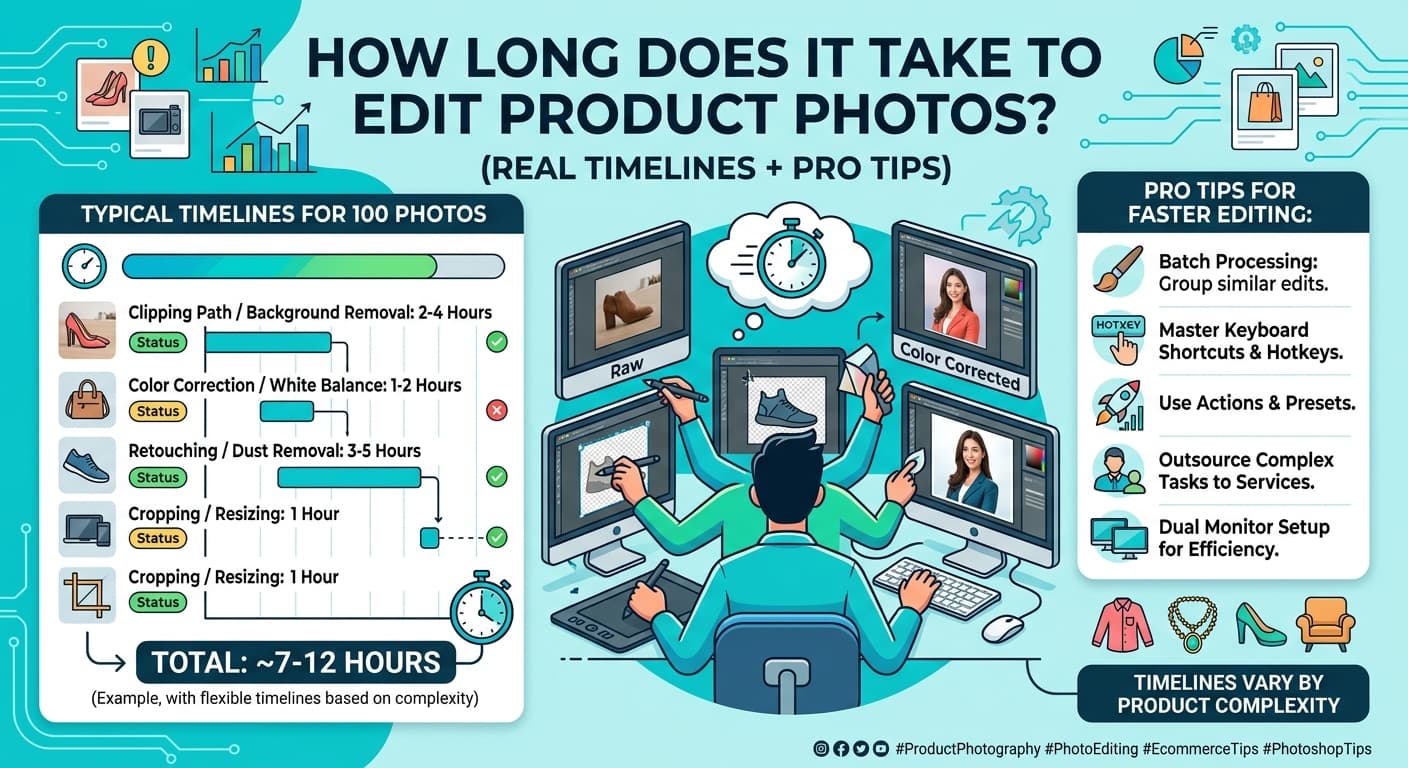
How long does it take to edit product photos? In most cases, product photo editing takes 5–15 minutes per image, but it can range from a few minutes to over an hour depending on complexity, tools, and skill level.
How long does it take to edit product photos? In most cases, product photo editing takes 5–15 minutes per image, but it can range from a few minutes to over an hour depending on complexity, tools, and skill level.
If you’re running an ecommerce store or working as a photographer, this timeline isn’t just a curiosity—it directly impacts your workflow, cost, and scalability. Fast, consistent Image editing helps you launch products quicker, maintain visual consistency, and stay competitive. On the other hand, complex edits like Ghost mannequin, Clipping Path, or detailed retouching can significantly extend the time per image.
Understanding realistic editing timelines allows you to plan better, decide when to automate, and know whether outsourcing or optimizing your Image making process makes more sense. Let’s break it down clearly so you know what to expect.
How Long Should It Take to Edit Product Photos?
The time required depends on the type of edits you’re doing. Simple adjustments take minutes, while detailed retouching can take much longer.
For example, a quick brightness fix or background cleanup is fast. But tasks like Multi Clipping Path or high-end product compositing require precision, increasing editing time significantly.
Product Photo Editing Time Breakdown by Task
Different editing tasks require different levels of effort, which directly affects time.
Basic adjustments like cropping, resizing, and exposure correction usually take just a couple of minutes. Background removal using Clipping Path can take 5–10 minutes depending on edge complexity. More detailed work, such as color correction and shadow creation, may take another 5–15 minutes.
Retouching tasks—like removing dust, scratches, or wrinkles—often extend editing time, especially for fashion or cosmetics. Advanced edits like Ghost mannequin or Multi Clipping Path are more time-intensive because they involve layering, masking, and precision detailing.
In short, the more precision and realism required, the longer the editing process becomes.
What Factors Affect How Long It Takes to Edit Product Photos?
Editing time isn’t fixed—it depends on several key factors that influence efficiency and complexity.
The quality of your original image plays a major role. Well-lit, sharp photos require minimal correction, while poorly shot images demand extensive fixes. Product type also matters—editing jewelry or reflective items takes longer than editing simple objects.
Your skill level and tools significantly impact speed. Experienced editors using advanced software or AI tools can complete tasks faster than beginners. The complexity of edits—especially when using Multi Clipping Path or detailed retouching—adds more time.
Volume is another factor. Editing a single image takes longer per unit compared to batch processing. Finally, platform requirements (like Amazon or Shopify guidelines) can add extra steps to your Image editing workflow.
How Long Does It Take for Beginners vs Professionals?
Beginner Editing Time
If you’re just starting out, editing product photos can feel slow and overwhelming. Beginners often take 20–60 minutes per image because they are still learning tools, workflows, and techniques.
You may spend extra time adjusting colors, fixing mistakes, or redoing steps. Tasks like Clipping Path or basic retouching can take significantly longer without experience. Trial and error is part of the process, especially when learning proper Image making techniques.
Intermediate Workflow Time
With some experience, your speed improves as you develop a consistent workflow. Intermediate editors typically take 10–25 minutes per image.
At this stage, you understand shortcuts, presets, and efficient editing techniques. You can handle standard edits quickly and manage moderate tasks like background removal or light retouching without much difficulty.
Using batch editing and templates starts to reduce overall time, especially for ecommerce catalogs.
Professional / Agency Time
Professionals and agencies work at a much faster pace, often completing edits in 3–15 minutes per image for standard tasks.
Their efficiency comes from:
- Streamlined workflows
- Advanced tools and automation
- Specialized skills in techniques like Ghost mannequin and Multi Clipping Path
For high-end retouching, even professionals may spend 30+ minutes—but the quality and consistency are significantly higher. Agencies also distribute work across teams, which speeds up large-scale projects.
How Long Does It Take to Edit Product Photos in Bulk?
When editing in bulk, the time per image decreases due to workflow efficiency. Batch editing allows you to apply the same adjustments across multiple images, saving significant time.
For example, editing 100 images might take 3–6 hours, while 500 images could take 1–3 days, depending on complexity. Simple edits like color correction and resizing can be applied quickly, but tasks like Clipping Path still require manual work.
The key difference is efficiency. Instead of repeating the same steps, you streamline your process and reduce redundancy in your Image editing workflow.
Bulk editing isn’t just about speed—it’s about consistency across your entire product catalog.
How Long Does It Take to Outsource Product Photo Editing?
Outsourcing product photo editing can significantly reduce your workload and turnaround time. Most services deliver edited images within 6–24 hours, depending on volume and complexity.
Freelancers may offer flexible pricing but can vary in speed and consistency. Agencies typically provide faster and more reliable turnaround times because they use teams and structured workflows. Studios often focus on high-end editing, which may take longer but delivers premium results.
Delivery time depends on factors like:
- Number of images
- Complexity (e.g., Ghost mannequin, Multi Clipping Path)
- Required quality level
Outsourcing is often the fastest way to scale your Image making process without sacrificing quality, especially for large ecommerce operations.
How to Reduce Product Photo Editing Time (Pro Tips)
Reducing editing time isn’t about rushing—it’s about working smarter. When you optimize your workflow, you can significantly cut down editing time without sacrificing quality.
Shoot Perfect Photos First
The fastest way to reduce editing time is to get your photos right during the shoot. Clean lighting, proper exposure, and a consistent background eliminate the need for heavy corrections later.
If your original image is sharp and well-lit, you won’t need extensive Image editing or retouching. For example, avoiding shadows and reflections during shooting reduces the need for complex fixes like Clipping Path adjustments or detailed masking.
A well-prepared shoot can cut your editing time in half.
Use Batch Editing & Presets
Batch editing is one of the most effective ways to speed up your workflow. Instead of editing each image individually, you apply the same adjustments across multiple photos.
Presets allow you to maintain consistency in color, tone, and brightness. This is especially useful for ecommerce stores where product images need to look uniform.
For large catalogs, this approach transforms your Image making process from time-consuming to scalable.
Use AI Photo Editing Tools
AI tools have changed how fast product photos can be edited. Tasks like background removal, color correction, and object cleanup can now be done in seconds.
Instead of manually drawing paths for Clipping Path, AI can automatically detect edges and remove backgrounds. While it may not replace high-end edits like Multi Clipping Path, it dramatically speeds up basic and mid-level editing tasks.
AI is especially useful for bulk editing and quick turnaround projects.
Create a Repeatable Workflow
A consistent workflow helps you avoid wasted time and confusion. When you follow the same steps for every image, you become faster and more efficient.
A simple workflow might include:
- Import → Basic adjustments → Background editing → Retouching → Export
Over time, this structured process reduces decision fatigue and speeds up your Image editing process. It also ensures consistent quality across all product images.
Outsource When Necessary
Sometimes the fastest solution is to delegate. If you’re dealing with hundreds of images or complex edits like Ghost mannequin, outsourcing can save hours or even days.
Professional editors and agencies specialize in handling high-volume work efficiently. While there is a cost involved, the time saved often outweighs the expense—especially for growing ecommerce businesses.
Best Tools That Speed Up Product Photo Editing
The right tools can dramatically improve your editing speed and efficiency. Professional editors rely on a mix of software and automation to handle different tasks.
Adobe Photoshop remains the industry standard for advanced Image editing, especially for tasks like Clipping Path, retouching, and compositing. Lightroom is ideal for batch editing and color correction, making it perfect for handling large volumes of images quickly.
AI-powered tools are becoming increasingly popular. They can automate background removal, enhance colors, and simplify your Image making workflow. While they may not fully replace manual editing for complex tasks like Multi Clipping Path, they are excellent for saving time on routine edits.
Choosing the right combination of tools depends on your workflow, volume, and quality requirements.
Cost vs Time: Is Faster Editing Worth It?
Faster editing often comes with trade-offs. While speed improves efficiency, it can sometimes reduce precision, especially for detailed work.
For simple product images, faster editing is usually worth it because consistency matters more than perfection. However, for high-end products that require techniques like Ghost mannequin or detailed retouching, investing more time ensures better quality.
In most cases, the best approach is balance—optimize your workflow for speed, but don’t compromise on the final output when quality directly affects conversions.
Real-World Examples of Editing Time
Editing time varies depending on the type of product and complexity involved. A simple product like a book or box may take just 3–5 minutes, especially with basic adjustments.
Clothing products often require more work, including wrinkle removal and shaping, which can take 10–20 minutes. Techniques like Ghost mannequin may increase this time further.
Jewelry is the most time-consuming category. Due to reflections, fine details, and precision requirements, editing can take 30–60 minutes, often involving advanced methods like Multi Clipping Path.
These examples highlight how complexity directly impacts editing time.
Frequently Ask Questions
How long does it take to professionally edit a photo?
Professional editing usually takes 5–15 minutes per image for standard work, but can go up to 30+ minutes for complex edits.
What is the 20 60 20 rule in photography?
The 20-60-20 rule suggests that 20% of your images will be great, 60% usable, and 20% unusable. It highlights the importance of shooting more to get better results.
How many photographers are making over $300,000 a year?
Only a small percentage of photographers reach this level, typically those working in high-end commercial or product photography.
Can I learn Photoshop in 3 months?
Yes, you can learn the basics of Photoshop in 3 months with consistent practice. However, mastering advanced techniques like Clipping Path or Multi Clipping Path takes longer.
How long does AI take to edit a photo?
AI can edit a photo in a few seconds to under a minute, depending on the task.